
Modify title
The Modify title action rewrites the page title on entry to a state. Use it to stamp a status onto every page running through a workflow (an “Approved” prefix on publication, a “[Draft]” tag while in review, a date suffix on archive) or to clean up titles in bulk. The form has two halves and they compose: a single action can both find-and-replace inside the title and wrap the result with a prefix and suffix. It runs in the main phase, in parallel with the other content-touching actions and before any Publish page on the same state, so a published copy reflects the rewritten title; see the Actions overview for how phases relate.
The form
Section titled “The form”The form has two sections, stacked. The top section is Find and replace; the bottom is Prefix and suffix. Both are optional, and a saved action can use either, both, or just one.
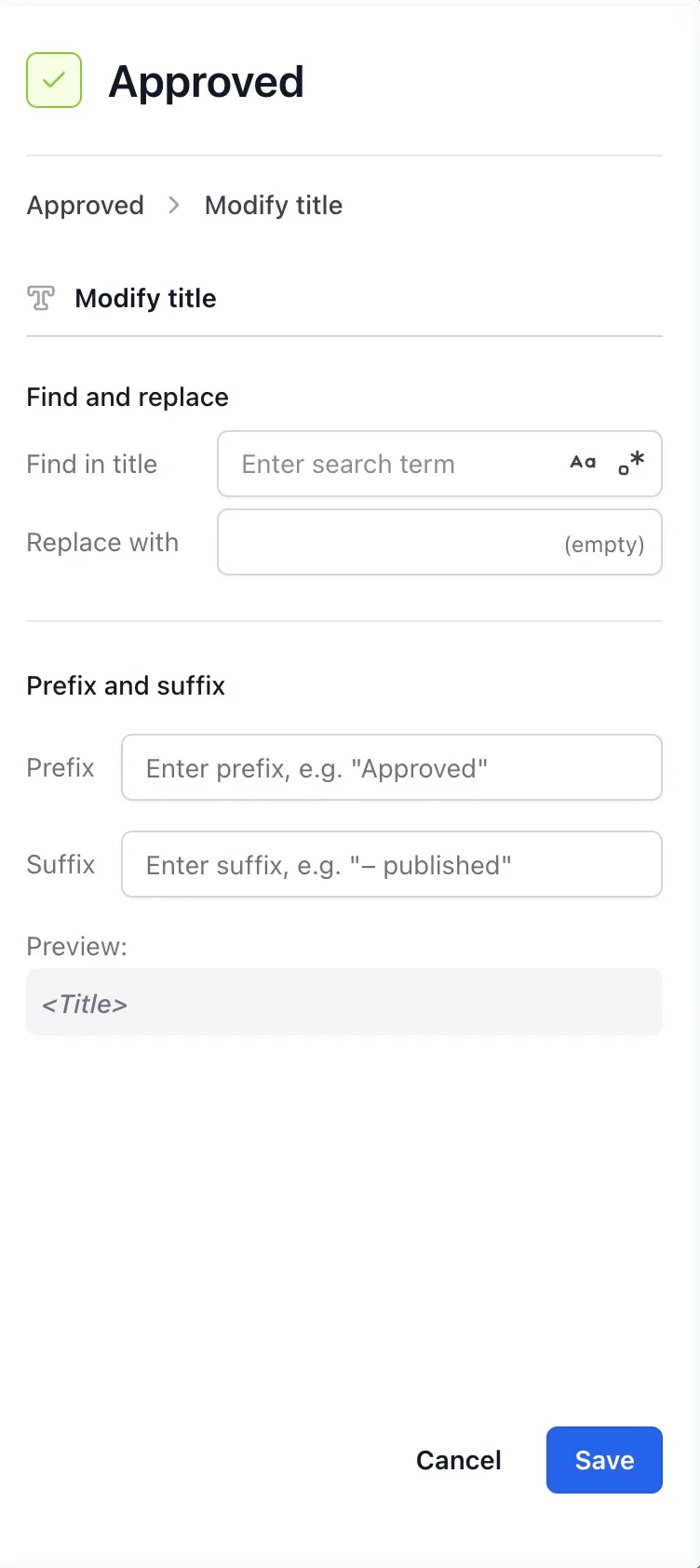
Find and replace has two fields. Find in title is the search term; Replace with is what it becomes. The find input has two toggle icons on its right edge: a Case sensitive switch and a Regex switch. With neither on, the search term is matched literally, ignoring case, and every occurrence is replaced. With Case sensitive on, the match respects letter case. With Regex on, the search term is read as a JavaScript regular expression, bare like \d+, or wrapped as /pattern/flags to override the defaults. In non-regex mode any regex metacharacters (., *, ?, [, and so on) are treated as plain text, so a literal (draft) in a title is matched by typing (draft), not \(draft\).
Replacements run on every match, not just the first. Leaving Replace with empty deletes every match instead. An empty Find in title skips the find-and-replace half entirely.
Prefix and suffix has a Prefix field, a Suffix field, and a live Preview: that previews the wrapped title against the placeholder <Title>. Aura Workflows inserts a single space between the prefix and the title and between the title and the suffix, so write the prefix as Approved, not Approved .
When both halves are filled in, the find-and-replace runs first, then the prefix and suffix are added to the result.
Idempotency
Section titled “Idempotency”The prefix and suffix half is idempotent. Aura Workflows checks whether the title already starts with the prefix before adding it, and whether it already ends with the suffix before adding that. A page that re-enters the same state, or moves to a later state applying the same prefix, is not double-stamped, so it’s safe to leave on every state of a status-driven workflow.
Find and replace is not idempotent. It runs the replacement every time. With a literal find-and-replace this is usually fine (replacing “draft” with “approved” the second time has nothing left to match) but a replacement that is itself matched by the search term will compound. Replacing v1 with v1.0 turns into v1.0.0 on the next run, because the freshly written v1 is found again.
Variables
Section titled “Variables”The find, replace, prefix, and suffix fields are plain text. They do not resolve workflow variables: writing @page_owner in the prefix produces a literal @page_owner on the page.
Effect on the page
Section titled “Effect on the page”A successful Modify title call edits the page. Aura Workflows saves a new version with the rewritten title, which counts as a Confluence edit, and the Aura Workflows app user becomes the page’s last editor. This matters for any later Send email action whose recipients include the Last editor role: until a human edits the page again, that role resolves to the app rather than a person. The emails configuration covers this wrinkle.
The action is a no-op when the rewritten title equals the original (prefix already in place, find term not present, replacement unchanged). No new version is created and the last-editor role is unaffected. The action still records a success in the page’s workflow history.
Failure
Section titled “Failure”The action fails if Confluence rejects the update, most often when the new title clashes with another page’s title in the same space, since space titles must be unique. The error surfaces in the Workflow actions entry of the page’s history; the transition completes normally and other actions on the state are unaffected. Pick prefixes and suffixes distinctive enough that two pages won’t collide on the same wrapped title.