
History macro
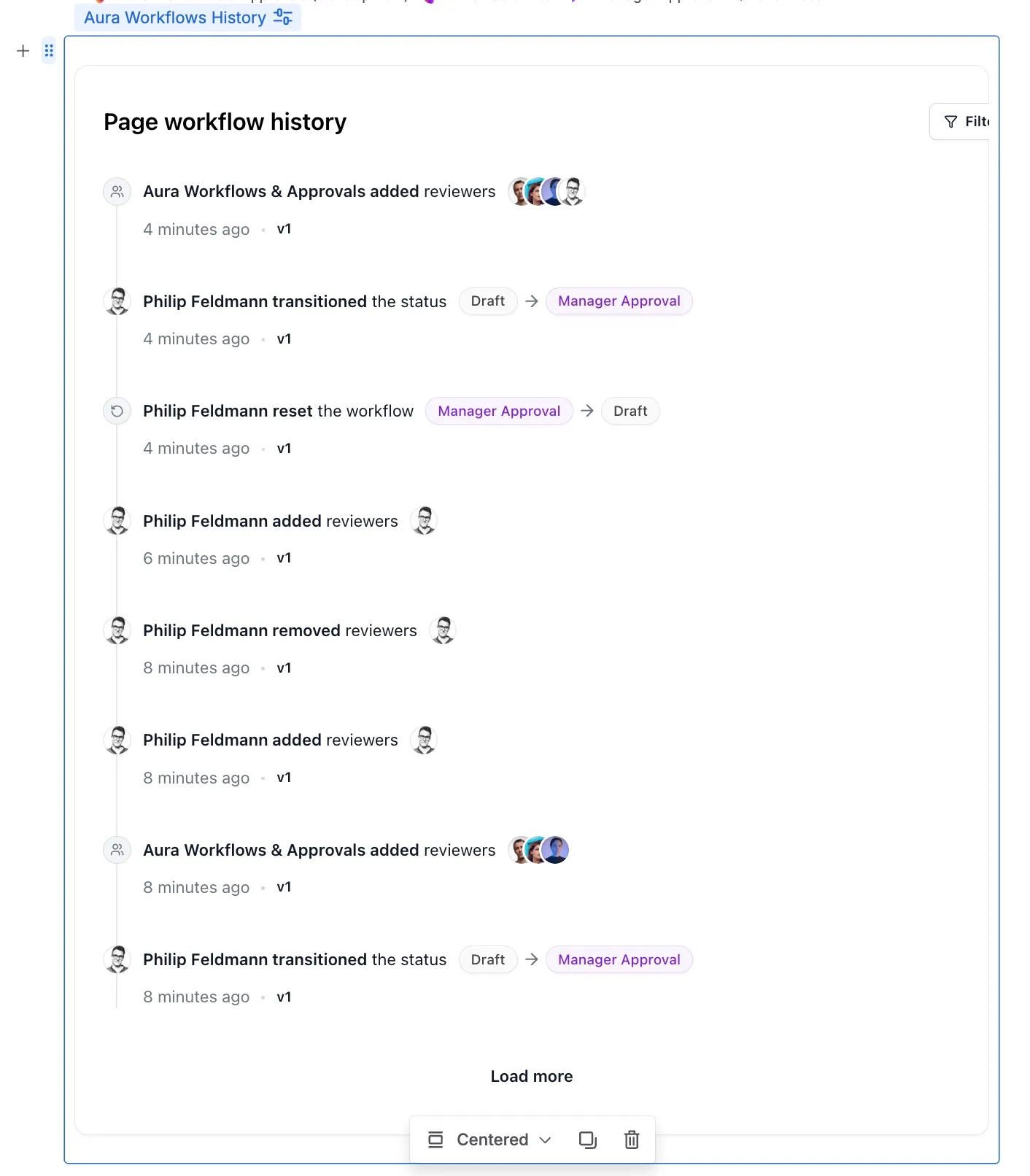
The History macro renders a chronological timeline of everything the workflow has done on the page it’s embedded on. State transitions, approvals, action runs, reviewer changes, and lifecycle events flow into one list, so a reader can scroll back through the page’s governance history without leaving the page.
Adding the macro
Section titled “Adding the macro”In the page editor, open the macro picker and choose Aura Workflows History. The macro is a block element that takes the full content width. There are no configuration fields; it reads from whichever workflow is currently applied. Loading is paginated: the first ten events render immediately, with Load more pulling further pages on demand. Inserted on a page template, the macro renders a placeholder and only fills with real events once the page is published and a workflow is applied.
What appears in the timeline
Section titled “What appears in the timeline”Each entry carries a relative timestamp, the actor who caused it, and a short description. Entries sort newest first.
State transitions show the move from one state to the next, labeled by the trigger: a manual selection, an approval, a rejection, an expiration, or a page-edit transition. Approvals collapse into a group attached to the transition they produced; each reviewer’s individual approve or reject decision and any comment they left is visible inside the group. If the current state is an approval state, it sits at the top of the timeline showing pending reviewers and decisions in progress.
Reviewer changes appear when someone is added to or removed from an active approval after the initial assignment. Page edits and page creation show up as plain entries; an edit that triggers an on-edit transition is folded into the transition rather than rendered twice. Expiration moves carry a clock icon and a system actor. Lifecycle entries cover points where the workflow itself changed: an instance being applied or removed, a migration to a different workflow, and edits to the workflow definition while it was attached.
Action runs
Section titled “Action runs”When a state’s actions run on transition, the timeline shows a Workflow actions row with one badge per action: Send email, Publish page, Add restrictions, Remove restrictions, Manage labels, Set official version, Modify title. A green check means the action succeeded; a red X means it failed, with the error message on hover. A failure on one badge does not imply the others failed: each action is reported independently because they run independently. See Actions for the execution model behind these results.
The workflow-actions row is hidden by default so routine successful runs don’t drown the rest of the timeline. Toggle Workflow actions in the filter dropdown to show it. Instances recorded before per-action results were tracked still show every badge with the same overall status, so the row is still useful, just less granular.
Filtering and permissions
Section titled “Filtering and permissions”The filter dropdown at the top right lets a reader hide event types they don’t care about: page edits, reviewer changes, official-version stamps, workflow configuration updates. The filter is local to the viewer’s session; it doesn’t change what other people see and doesn’t persist across reloads.
The macro mirrors page visibility. Anyone with view access to the page sees the full timeline. Aura Workflows doesn’t gate history entries by role, on the principle that audit information should be transparent to everyone who can see the page itself. If you need to keep audit detail away from some readers, restrict the page rather than the macro. A page that has never had a workflow applied renders an empty state instead of the timeline.
For the rest of the surfaces, see the other macros, and for the policies driving most transitions, see Approvals.