
Email Notifications
Aura Workflows sends email from many places: approval reminder, approve, and reject messages, page-edit and expiration events, and the standalone send-email action. There is no central email screen (each email is configured where it lives), but they all share the same recipient model, templating rules, and delivery behavior.
Global settings
Section titled “Global settings”Email delivery, locale, and bundling are global. Under Apps → Aura Workflows → Administration → Emails, you can disable all outgoing Aura Workflows emails for the whole instance, pick the Email language used to render every template, and control Bundle notification emails digest mode (covered below).
Recipients
Section titled “Recipients”Every email config exposes the same picker: a row of role checkboxes plus an Assigned recipients field for specific users, groups, workflow variables, and free-form email addresses. The role checkboxes are:
- Author: the original creator of the page.
- Page owner: the Confluence-defined owner. If no owner is set, the role contributes nobody.
- Last editor: the author of the page’s most recent version.
- Pending reviewers: only meaningful inside an approval. Resolves to whoever still has an open approval slot at send time; reviewers who have already responded are excluded.
A wrinkle on Last editor: a workflow transition that does not modify page content does not count as an edit. But some Aura Workflows actions do edit the page (Modify title and Publish, for instance), and after those run, the Aura Workflows app user becomes the last editor. Subsequent emails to that role go to the app, not a human, until someone edits the page again.
Variables in Assigned recipients resolve at send time against the values stored on the page’s workflow instance, so updating a variable on a page changes who receives the next email. Specific users and groups also resolve at send time, picking up group membership changes between configuration and delivery. Recipients are de-duplicated by account ID, so a user who is both author and a pending reviewer receives one email rather than two. Free-form email addresses are de-duplicated separately from account-based recipients: if the same person appears once as a Confluence user and once as a typed-in address, they receive two copies.
If a recipient’s account has been deactivated, has hidden their email address, or otherwise resolves to no address, that recipient is dropped silently. When every recipient drops out, the message isn’t sent.
Subject and body
Section titled “Subject and body”Subject is plain text. Message uses a rich editor with basic formatting and placeholders.
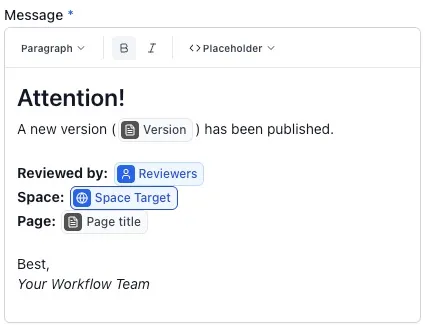
Use the Placeholder menu in the message editor to insert workflow variables, workflow metadata fields, and page details such as page title, author, owner, version, and last update information. Placeholders resolve when the email is sent, so later page-variable or metadata changes are reflected in the next message. If a placeholder has no value at send time, Aura Workflows falls back to its placeholder label rather than blocking the email.
You don’t need to add the page title or a link yourself: the email template wraps every body with the page title, a link, and a View page button automatically. Approval emails additionally render the per-reviewer status, comments, and timestamps under whatever text you wrote. Formatting from the message editor is preserved; raw Markdown and HTML are not interpreted, and attachments are never included.
Timing
Section titled “Timing”Most emails fire as soon as the event happens. Approval and rejection emails go out the moment the transition completes, publish emails fire after the publish action finishes, and the page-edit notification fires when Confluence reports the edit. Two configurations are scheduled instead.
Approval reminders are scheduled at transition time. Aura Workflows takes the moment the page enters the state, adds the offset configured on the reminder, and queues a single send for that point in time. The reminder lands on the next hourly sweep after that timestamp. If the page leaves the state before the reminder is due, it’s cleared and never sends. With Repetition enabled, a follow-up reminder is queued at each interval as long as the page stays in the state with pending reviewers.
Expiration reminders work the same way. When a state with expiration is entered, Aura Workflows computes the expiration date and subtracts the lead time you configured on the reminder to get the timestamp. Both timestamps are stamped onto the workflow instance at transition time, so later edits to the workflow definition do not retroactively change them on existing pages. If the page transitions out of the state before the reminder fires, the reminder is dropped.
Digest mode
Section titled “Digest mode”When Bundle notification emails is on, most messages are not delivered as they happen. Each one is recorded as a pending notification keyed by recipient. Once an hour, Aura Workflows sweeps the pending notifications, groups them by event type and content, and sends one digest per recipient with up to ten items. Recipients with nothing pending get nothing.
Bundling is system-wide rather than per-workflow or per-email. Approval transition emails, publish emails, page-edit emails, expiration reminders, and approval reminders all bundle. The standalone send-email action opts out: it’s treated as a deliberate one-shot message and always delivers immediately, even when bundling is on.
Delivery failures
Section titled “Delivery failures”Email delivery is best-effort. Transient failures during sending are not retried, and Aura Workflows does not surface bounces or complaints in the UI. If an address is failing, you’ll hear from the recipient rather than the app. For approval and expiration reminders, the scheduled-sweep model means a sweep that fails to deliver loses those notifications rather than rescheduling them.
Where to go next
Section titled “Where to go next”For the per-config UI, see Approvals, Expiration and freshness, and the send-email action. For variables used as recipients, see Variables and metadata. For the broader workflow model, see the Workflow Builder and the Actions overview.