
Send email
The Send email action drops a one-shot message into the inboxes of a chosen audience whenever a state runs its Actions list. Use it to tell an author their draft has landed in review, nudge a stakeholder that something has been published, or copy a fixed mailing list on every entry into a compliance state.
Add it from a state’s Actions section in the Workflow Builder: click Add action, pick Send e-mail, and fill in the form. The action runs in the main phase of the three-tier execution model, in parallel with the other main-phase actions on the same state. There is no guaranteed order between two Send email actions on the same state, and a failure in one does not stop the others. Each transition into the state fires the action once; entering the same state twice in a row sends the email twice.
Fields
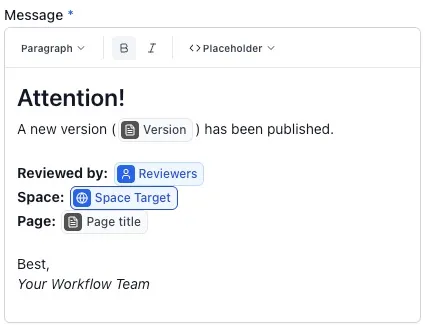
Section titled “Fields”Subject is the email subject line and is required. Message is the body and is required. The message editor supports headings, bold, italic, and placeholder chips for workflow variables, workflow metadata, and page details such as page title, author, owner, version, and last update information. Placeholders resolve when the action sends the email, using the current values for that page. The body is wrapped automatically with the page title, a link, and a View page button by the email template, so don’t repeat that scaffolding yourself. Raw Markdown and HTML are not interpreted, and attachments are never included.
Users is the recipient picker. It accepts Confluence users, groups, workflow variables of type “users”, and free-form email addresses typed in directly. Three role checkboxes sit underneath: Include author, Include owner, and Include last editor. The recipient model (how each role resolves, how variables are read at send time, how deactivated users and missing email addresses are dropped silently) is the same as every other email Aura Workflows sends and is covered on the Email notifications page. The pending-reviewer role available on approval emails is not offered here: Send email is not tied to an approval.
The Users field carries a tooltip noting that up to 90 users will be notified. The cap applies to all resolved recipients: when roles, groups, variables, and individually picked users expand past 90 unique recipients, only 90 receive the email and the rest are skipped. Free-form email addresses are handled separately from account-based recipients.
Timing and failures
Section titled “Timing and failures”The action fires the moment the transition completes. There is no delay setting and no schedule. Recipients picked by variable resolve at that same moment against the values stored on the page’s workflow instance, so updating a variable changes who the next firing reaches but does nothing for sends that have already gone out. Group memberships also resolve at send time.
If the action ends up with no resolvable recipients (every role contributed nobody, every user was deactivated, every variable was empty) it records a success and no message is sent. A genuine failure shows up in the page’s workflow history under the Workflow actions entry alongside the other main-phase results. The transition itself completes regardless; failed emails do not roll the page back.
For messages tied to a reviewer approving or rejecting, configure the email on the approval transition directly rather than on a destination state. For freshness reminders, use the expiration emails on the state with the timer. Send email is what’s left: a freestanding announcement triggered by a transition into a particular state.